

What is a LinkedIn Feature Page?
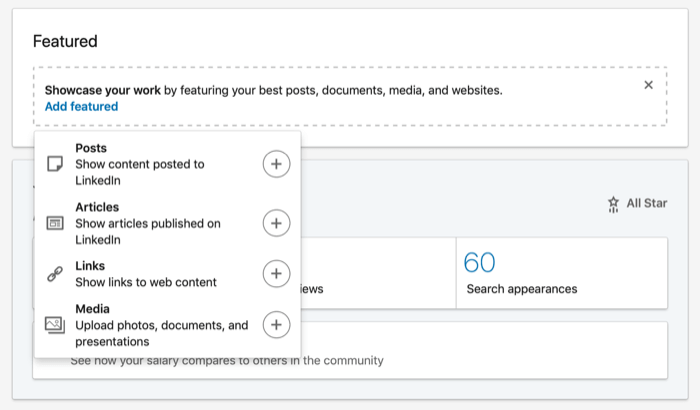
A LinkedIn Feature Page is a section on your LinkedIn profile that allows you to pin important content, such as posts, articles, documents, and external links. Unlike regular posts that get buried in your feed over time, featured content remains visible at the top of your profile.
This makes it a powerful tool for professionals and businesses to showcase their best work, ensuring visitors quickly see what defines their expertise and credibility.
Why is the LinkedIn Feature Page Important?
The LinkedIn Feature Page is essential for individuals and businesses looking to build a strong online presence. Here’s why:
- Increased Visibility – Important content stays at the top of your profile, making it easily accessible.
- Stronger Professional Branding – It helps highlight your achievements, expertise, and thought leadership.
- Enhanced Engagement – Posts with images, PDFs, and links typically receive higher engagement compared to plain text posts.
- Lead Generation and Networking – Potential clients, recruiters, or business partners can quickly see relevant content that encourages interaction.
How to Use the LinkedIn Feature Page Effectively
To maximize the potential of the LinkedIn Feature Page, follow these key strategies:
- Pin Important Posts
Your LinkedIn Feature Page allows you to pin posts that highlight your expertise. These can include:
- Industry insights or trends
- Key announcements, such as product launches
- High-performing posts that generated strong engagement
Keeping these posts at the top of your profile ensures they get seen by visitors.
- Showcase Articles and PDFs
If you have published LinkedIn articles, research papers, or case studies, the Feature Page is the perfect place to display them. Content types that work well here include:
- Whitepapers and reports
- Presentation slides
- Client testimonials or success stories
This is especially beneficial for professionals in marketing, consulting, and research who want to establish themselves as experts in their industry.
- Link to External Work
The Feature Page also allows users to add links to external resources such as:
- Personal websites and blogs
- Online portfolios
- Press mentions or media features
For instance, a digital marketer can link to a campaign case study, while a designer can showcase a portfolio of past work.

Who Should Use the LinkedIn Feature Page?
The LinkedIn Feature Page is useful for a variety of professionals, including:
- Job Seekers – They can highlight resumes, recommendations, and key skills.
- Content Creators – Writers, designers, and marketers can feature their best work.
- Business Owners and Brands – Companies can display case studies, client testimonials, or service highlights.
Recruiters and hiring managers often look for well-organized profiles, and a properly structured Feature Page can make a lasting impact.
LinkedIn Feature Page: Key Statistics
To understand why the LinkedIn Feature Page is valuable, consider these statistics:
- LinkedIn reports that posts with images and PDFs receive three times more engagement than plain text posts.
- According to a study by Kinsta, LinkedIn generates 80% of B2B social media leads, making it the top platform for professional networking.
- Job seekers with featured content on their profiles are 40% more likely to be contacted by recruiters, according to LinkedIn insights.
These numbers highlight the potential of leveraging LinkedIn’s Feature Page to improve visibility, engagement, and career opportunities.
